GUIDE / 01 · CONTROLS
Taipei GTA
keyboard controls.
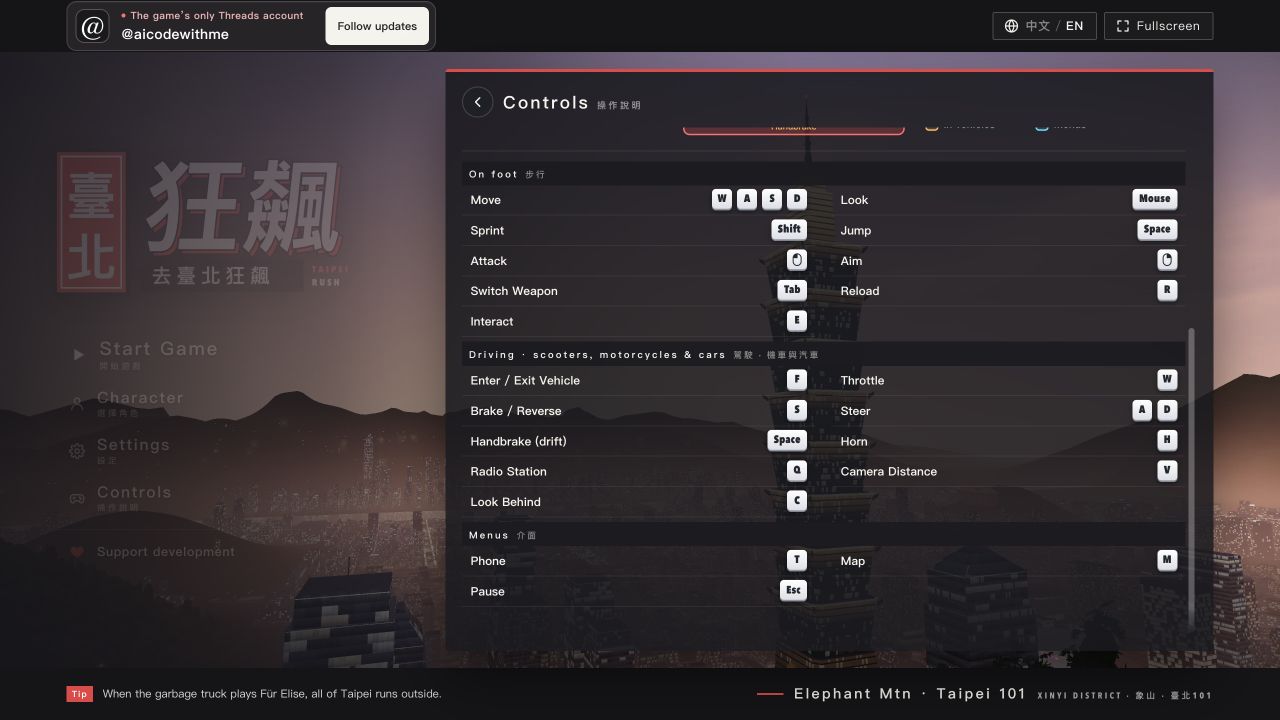
This reference follows the keyboard mapping visible in the game's current public code and menu. Versions and devices can differ, so test a key once in a safe place after loading.
QUICK ANSWER
What are the Taipei GTA keyboard controls?
Use WASD to move, F to enter or exit a vehicle, E to interact, M for the map and Esc to pause. Click inside the game first so it receives keyboard focus. These mappings were checked against the original controls dialog.
Movement and driving
Interface and city
Mobile and controller
The original game page shows Keyboard&Mouse, Gamepad, and Touch tabs. Its Touch prompt describes a left virtual stick for movement and right-side dragging for the view. The full gamepad button map, the touch buttons and the lag settings are in the mobile and gamepad guide.
If a key does nothing, click inside the game so the iframe receives keyboard focus. A "document loaded" message does not mean every 3D asset has finished loading; wait a little longer when the connection is slow. Source: original game page.