GUIDE / 05 · MOBILE
Taipei GTA on mobile: touch controls and loading
The original game includes touch instructions. Find the controls menu, landscape prompts and loading checks here; performance depends on your device. This is an independent game guide.
The in-game Touch option
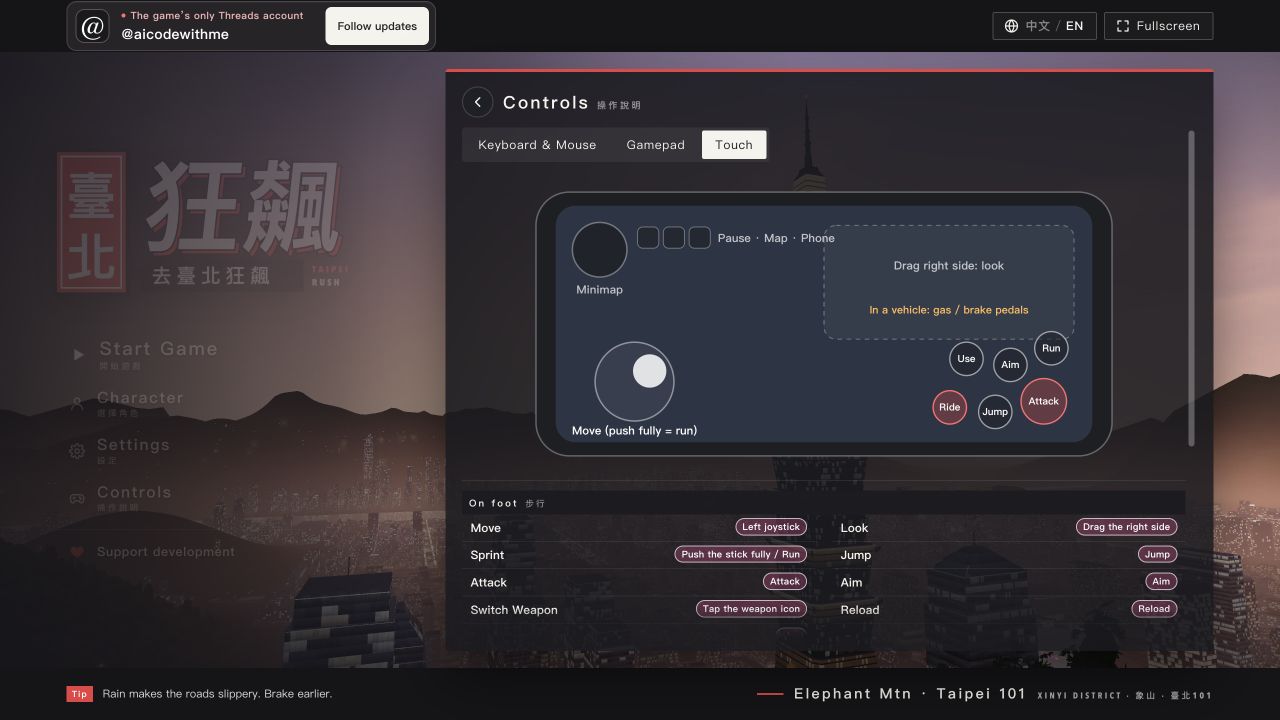
The original controls dialog has Keyboard&Mouse, Gamepad, and Touch tabs. Its Touch tab says to move with the left virtual stick and drag on the right side to look around. That is the game's own instruction; read the controls reference; in the desktop-browser observation, find it through Controls → Touch in the menu.
When mobile loading prompts appear
The game's public code includes a landscape reminder and prompts for graphics-memory limits or loss. If a portrait prompt appears, rotate to landscape first. If the page keeps reloading, check the following:
- Close unused tabs so the browser has more room for the game.
- Open the original game page directly to rule out the embed.
- If reloads continue, try a desktop browser instead.
We have not tested an iPhone, Android phone, or controller, and we do not have a per-model or controller-button map. The Touch tab shows that the game offers this entry; Touch support does not mean every phone runs it well. Source: original game page.