FIELD NOTES / GETTING STARTED
How to play Taipei GTA: a ten-minute beginner guide with screenshots
Loading, character choice, the HUD, your first mission, phone, map, saves and settings: the first ten minutes of Taipei Rush, shown with screenshots captured on this site.
QUICK ANSWER
How do I start playing Taipei GTA?
Let the game load on this site's home page, click the game area once and choose New Game. You start in Ximending 西門町 with NT$500 and the prologue already running: follow the gold 「明」 marker to meet Cousin Ming. Then press T for the phone and missions, M for the map, and buy a NT$13 tea egg at a convenience store when you get hurt.
Before you start: where to play and the first click
Taipei Rush 臺北狂飆, widely searched as Taipei GTA, is a browser game: no install, no account. The game area on this site's home page loads it by itself. Keyboard and mouse, gamepad and touch all work, but a desktop browser with a keyboard is the easiest first run.
The first visit downloads the game files, so the wait depends on your connection; after 20 seconds the home page shows a still-loading notice with a Reset load button. When the game appears, click inside it so your keys reach the game. Out on the street, a prompt at the top reads Click to control the camera; one more click and the mouse turns the view.
- Fullscreen sits on the home page game area, at the top right of the title screen and in the pause menu.
- One city per tab. Open the same city twice and the game shows The game is open in another tab, with a Play in this tab button, so two tabs cannot overwrite each other's progress.
Title menu and character: New Game, Continue, Jie or Wen
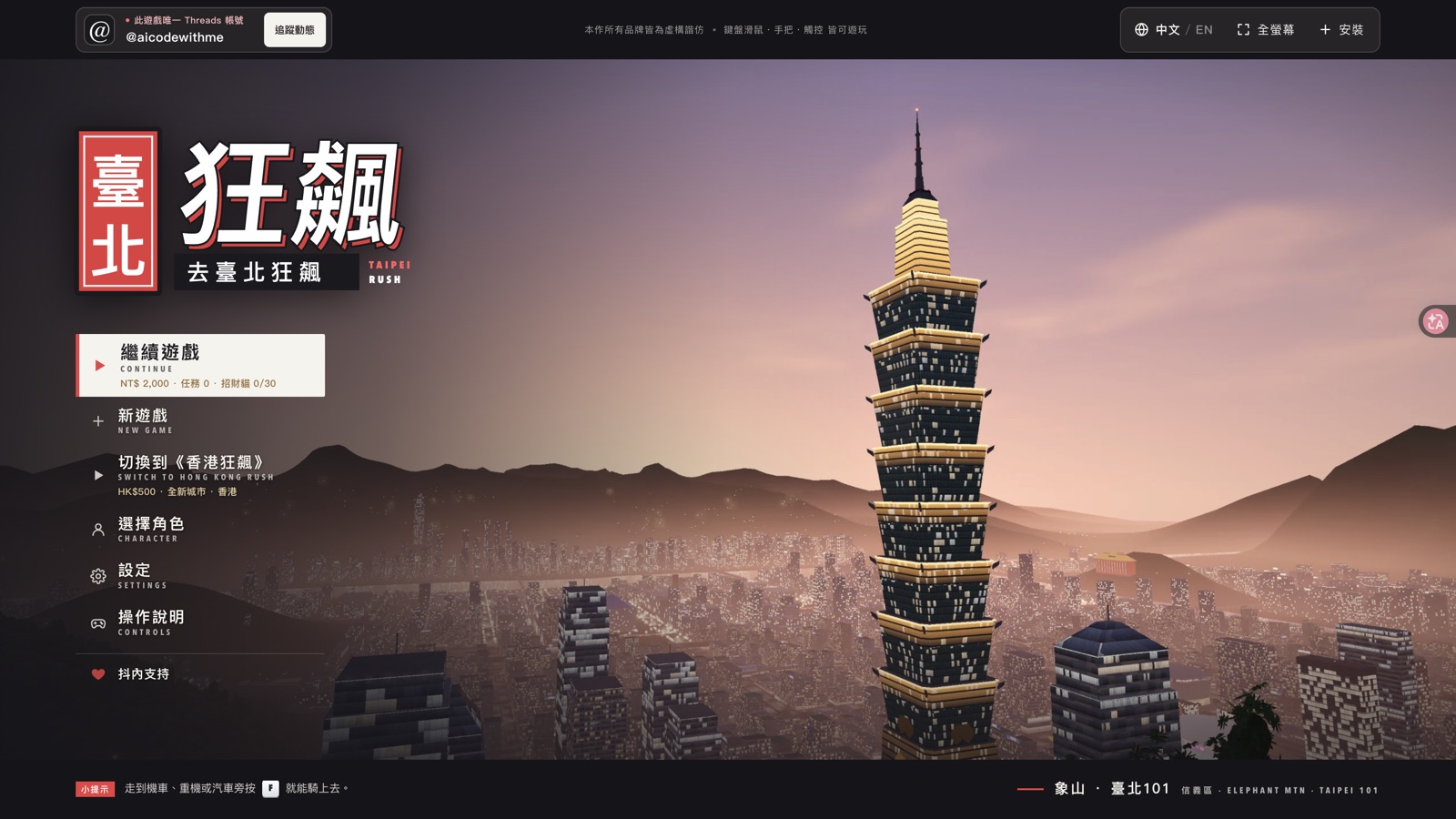
The title menu runs Continue, New Game, Switch to Hong Kong Rush, Character, Settings, Controls and Support development. First time, pick New Game; once a save exists, Continue lists its cash, missions done and lucky cats found. Do not press New Game casually on a save you care about: the confirmation in the code reads Starting a new game erases your save. Continue?
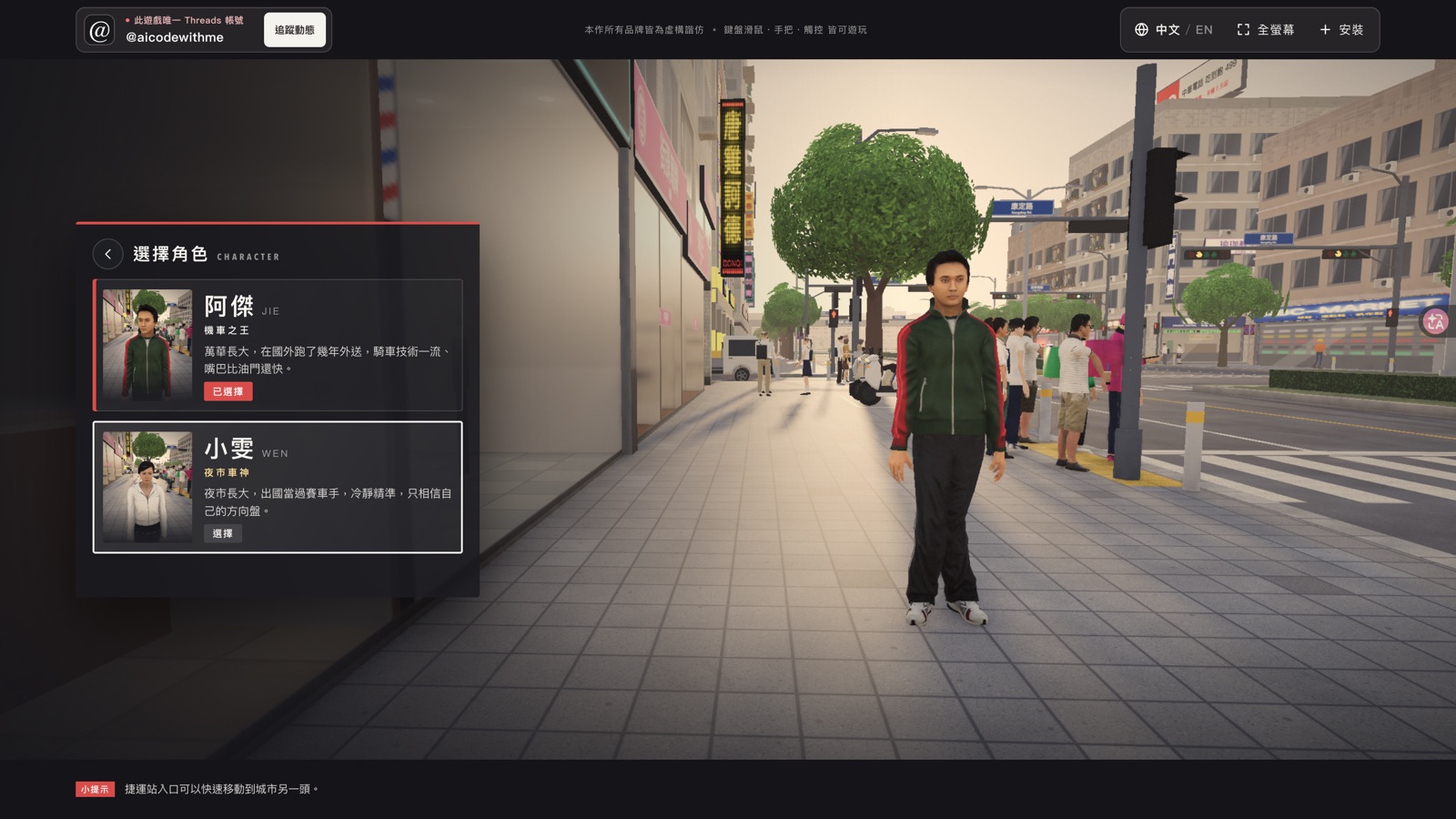
Jie 阿傑, the Scooter King, grew up in Wanhua and spent years abroad as a delivery rider. Wen 小雯, the Night Market Racer, grew up in the night markets and raced abroad. The code defaults to Jie. The menu shows no stats, and in the code the choice only changes the model, idle animations, footsteps and how the story addresses you; no riding or driving stat difference turned up. This site has not compared their handling in play, so pick the look you like.
Reading the screen at the start
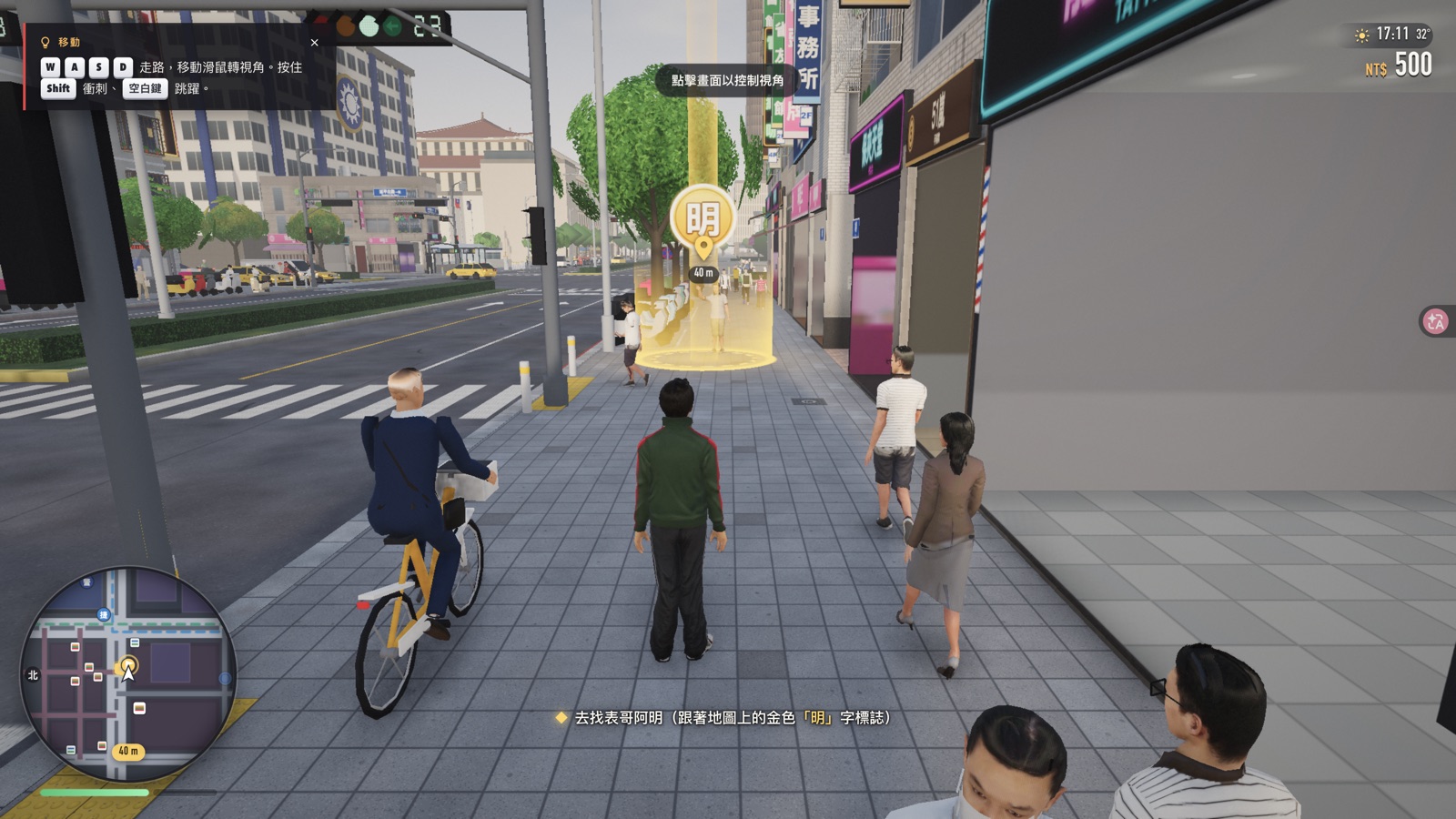
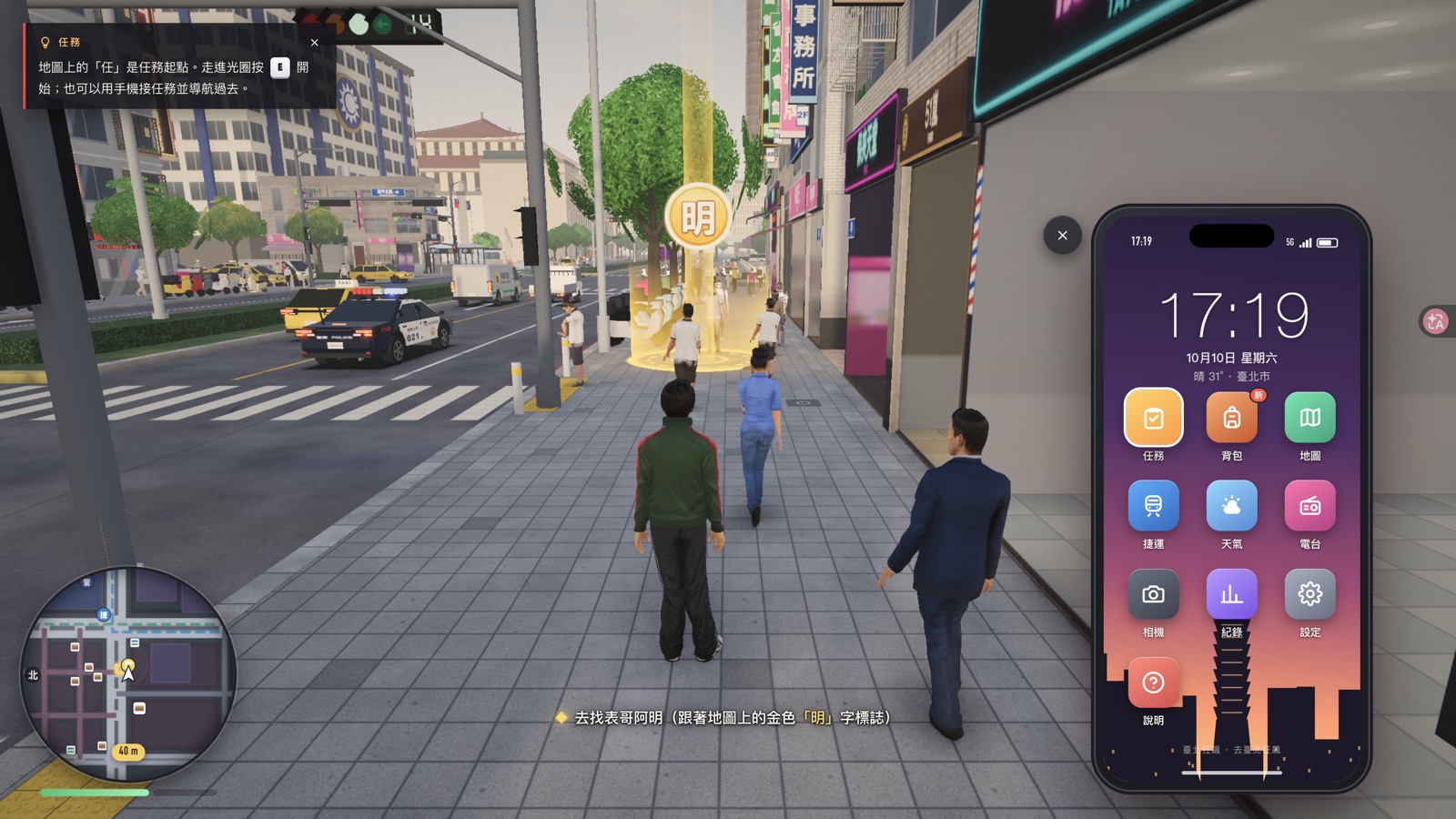
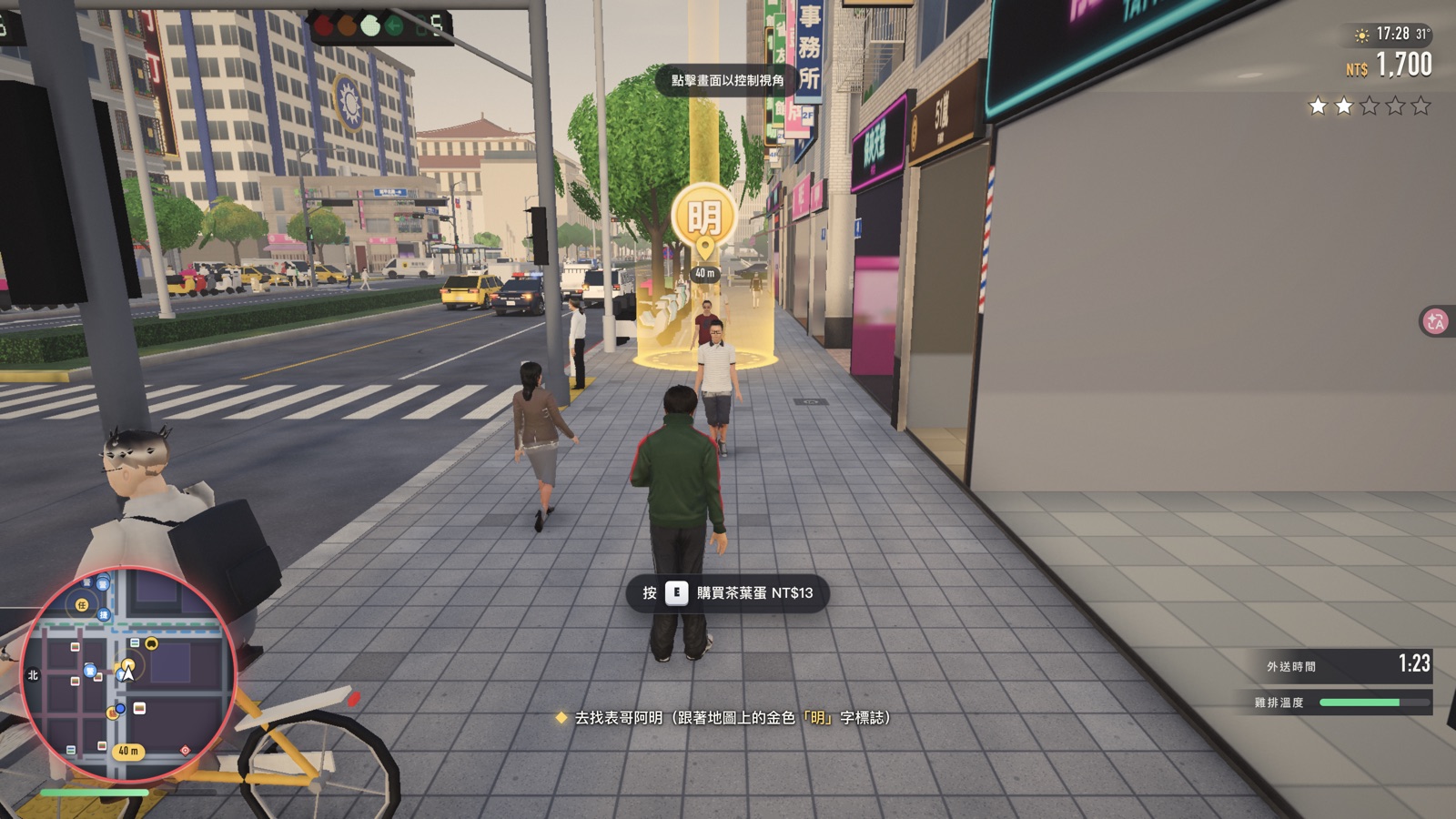
New Game drops you on the sidewalk of Sec. 2, Zhongxiao W. Rd. in Ximending 西門町 with NT$500, and the prologue Back in Taipei 回到臺北 is already running.
| Where | What it shows | Why it matters |
|---|---|---|
| Top right | Weather, clock, temperature and NT$ cash | Purchases come out of it |
| Under the cash | Wanted stars, only while wanted, five slots | Stars lit = wanted level |
| Bottom left | Minimap: north, your arrow, shop and MRT icons, distance to target | Draws the route once a waypoint is set |
| Under the minimap | A green bar | The code identifies it as health |
| Center | Gold 「明」 marker, light beam and distance | Where the objective is |
| Bottom center | Objective: Meet Cousin Ming — follow the gold 「明」 marker | What to do now |
| Top left | Tutorial hint card; × closes it | One lesson at a time |
The code defines eight one-time lessons. In this site's session they appeared as Getting around, then Missions, then Wanted. Settings can show them again.
Learn to move: walk, sprint, jump, ride
Controls opens from the title menu and the pause menu, with Keyboard & Mouse, Gamepad and Touch tabs. For the first ten minutes you need these:
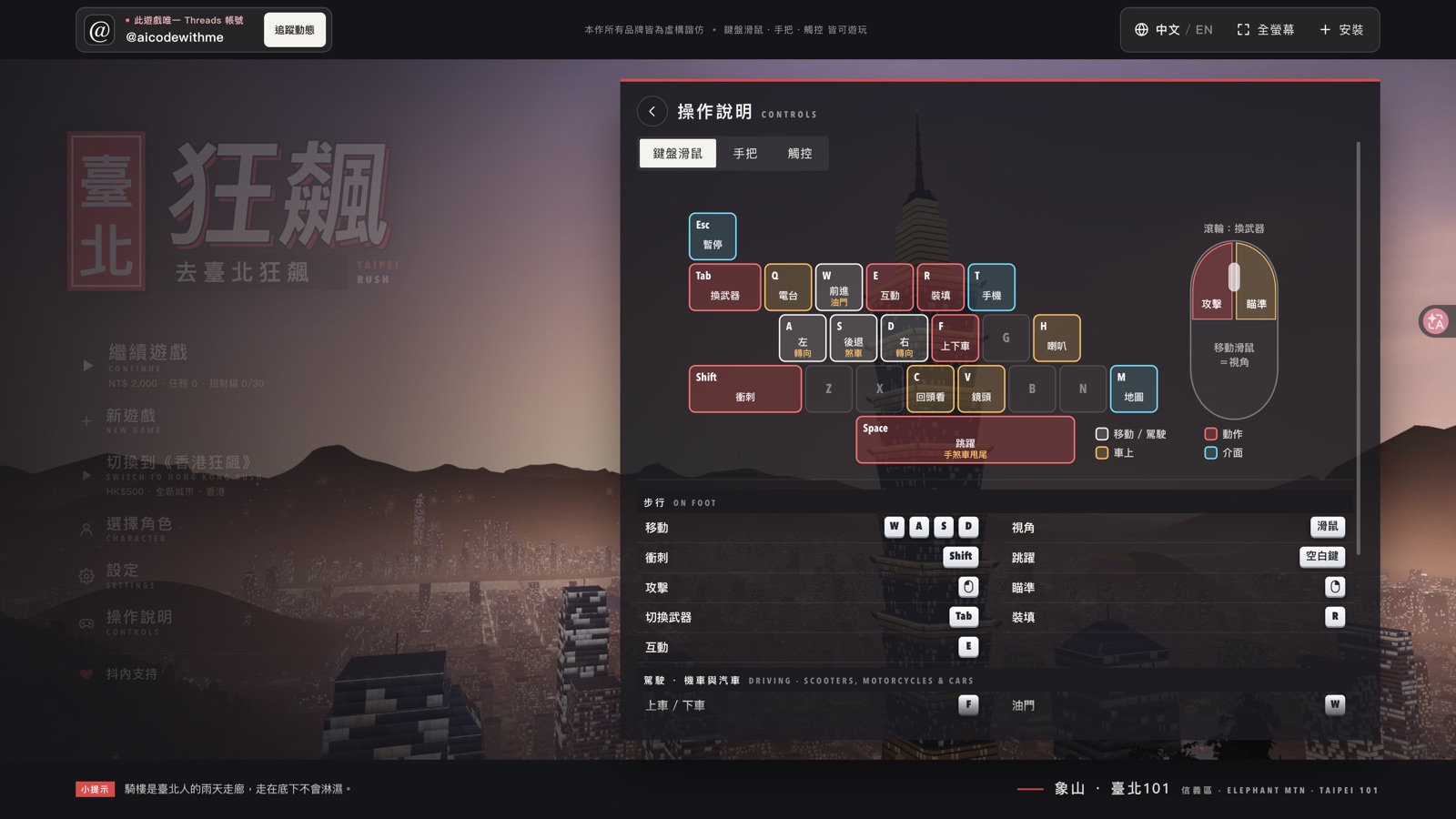
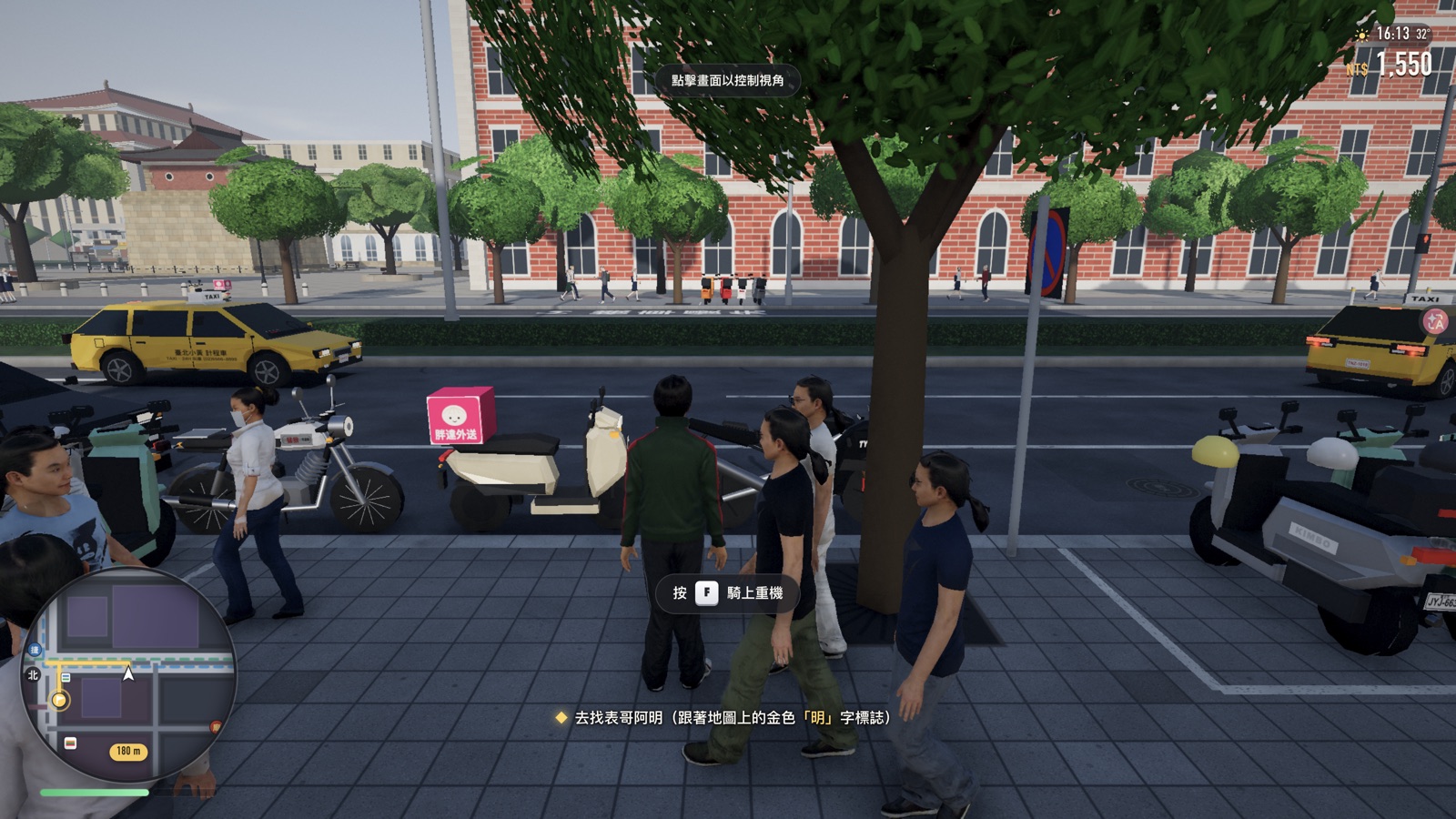
- The loading tip: press F next to a scooter, motorcycle or car to ride it. Doing that to a moving car is a carjack, and the police notice.
- Scooters filter through traffic and can ride onto sidewalks, though a title tip warns the police are watching.
- In a vehicle, Space becomes the handbrake; H horn, Q radio, V camera distance, C look behind.
| Action | Keyboard & mouse | Gamepad (Xbox labels) |
|---|---|---|
| Walk / look | W A S D / move the mouse | Left stick / right stick |
| Sprint | Hold Shift | B |
| Jump | Space | A |
| Interact (buy, start a mission) | E | X |
| Enter / exit vehicle | F | Y |
| Throttle / brake and reverse / steer | W / S / A D | RT / LT / left stick |
| Handbrake (drift) | Space | A |
| Phone / map / pause | T / M / Esc | D-pad up / ⧉ / ☰ |
Your first mission: follow the gold 「明」
The prologue Back in Taipei starts on its own with a new save. The objective, Meet Cousin Ming — follow the gold 「明」 marker, points 40 m up the sidewalk; just walk there. For later missions the tutorial names two routes: step into the circle at a 任 marker and press E, or pick a job on your phone and follow the GPS.
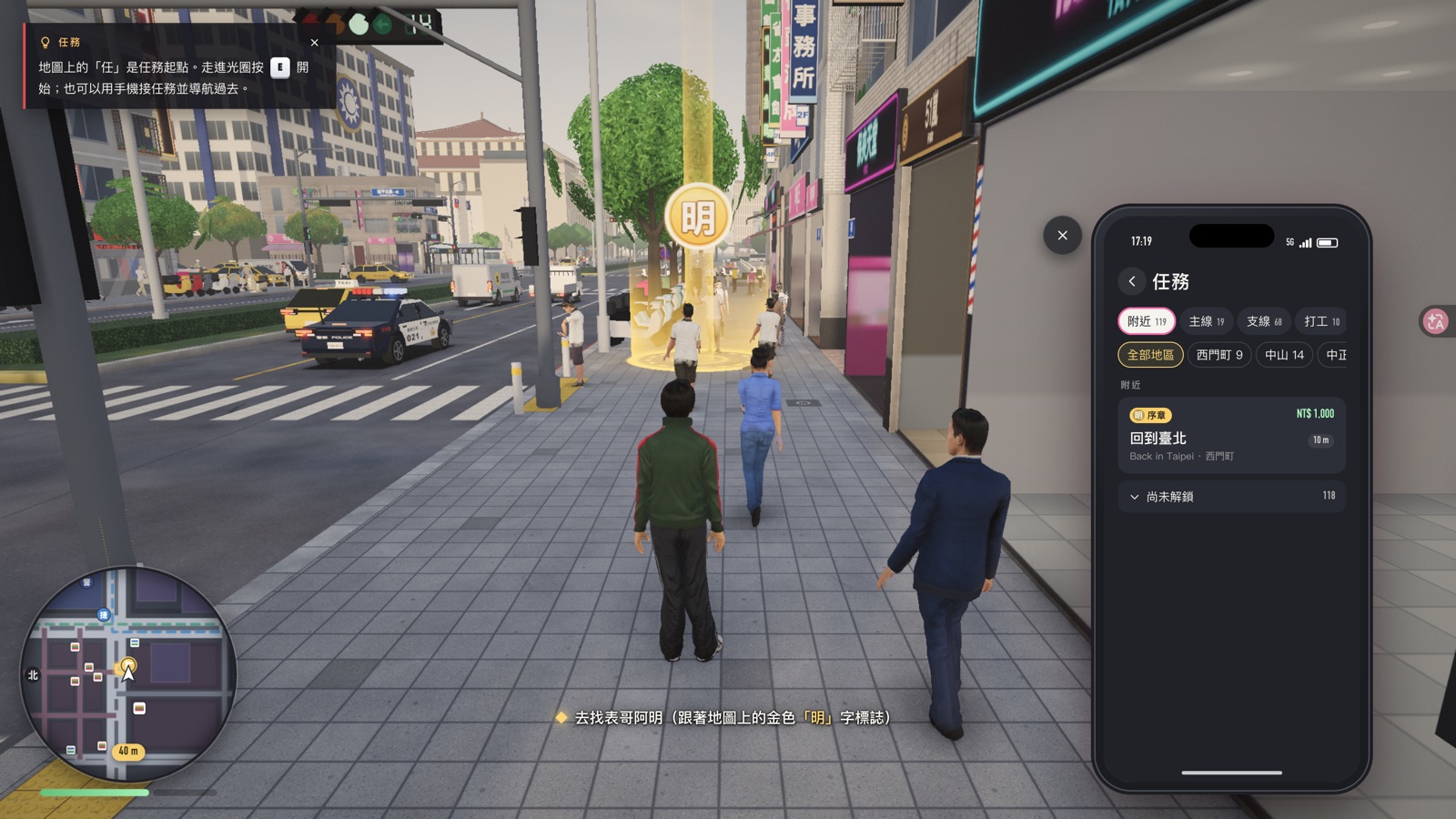
Press T and open the Missions app. Tabs read Nearby 119, Story 19, Side 68, Job 10, Race 8 and Culture 14, with an area filter below. At the start, Nearby holds one available card, the prologue at NT$1,000, while 118 more sit under Locked. Finish the prologue first; this site has not checked how each of the others unlocks.
| Step | Prologue prompt from the code (keyboard keys filled in) |
|---|---|
| 1 | Follow Ming (the 「明」 badge over his head) |
| 2 | Press F to get on Ming's motorcycle |
| 3 | W throttle, S brake, A D steer — follow the GPS route |
| 4 | Press F to get off |
| 5 | Walk in and press E at the counter to buy a tea egg (NT$13) |
| 6 | Press T to open your phone |
| 7 | Press M to open the map |
Listed in the order the prologue code holds them. This site confirmed the first objective and mission card in play but has not finished the prologue; the game decides the live order.
Map and GPS: press M, click once
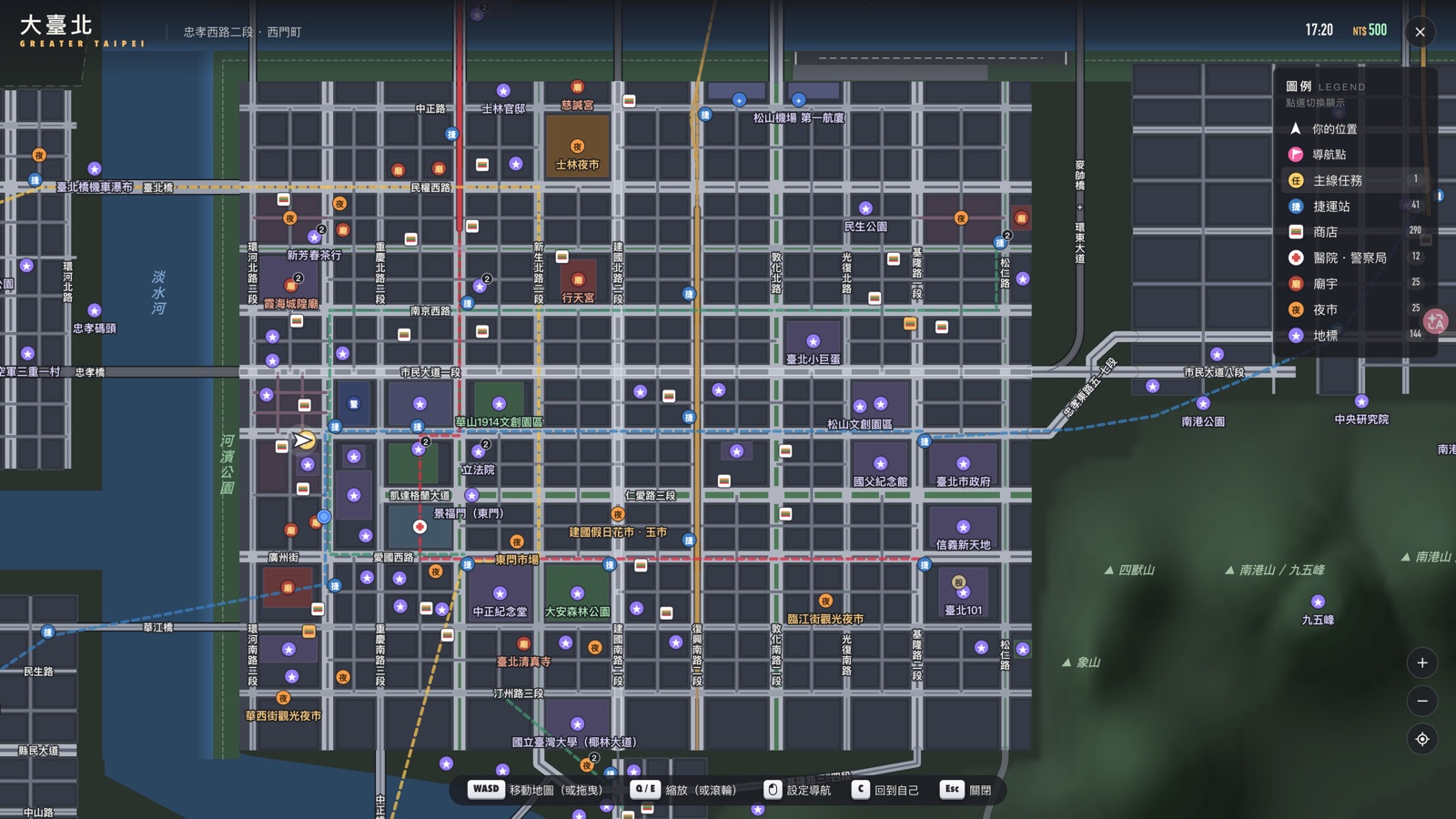
M opens the full-screen GREATER TAIPEI map 大臺北, with your street at the top left. The bottom bar lists the controls: WASD or drag to pan, Q/E or the wheel to zoom, click to set a waypoint, C to center on yourself, Esc to close. Set a waypoint and the minimap draws the route; click legend rows to toggle them.
For long trips, take the MRT: the loading tip says entrances fast-travel you across the city, and the phone's Metro app sets GPS to a station so you can ride from the entrance with E.
Staying alive: tea eggs, hospitals, lights and stars
Tea eggs are the cheap heal: press E at a convenience-store counter and pay NT$13. The code gives each one +25 health and sends eggs bought at full health to your Bag.
Run out of health and you are WASTED. The code sends you to NTU Hospital 臺大醫院 in central Taipei with a bill of roughly 10% of your cash (NT$100 to NT$5,000); BUSTED takes you to the police station, fines roughly 12% and confiscates firearms. Both reset the wanted level. This site has not tested either in play.
| Situation | What the game tells you | What to do |
|---|---|---|
| Hurt | Tea eggs from convenience stores restore health — only NT$13. | Buy one with E |
| Junction | Don't gamble on yellow — speed cameras are watching. | Read the countdown, stop on yellow |
| Rain | Rain makes the roads slippery — brake earlier. | Brake early |
| Wanted | Break line of sight and get out of the search circle on the minimap — flashing stars fade out. | Leave the circle, then hide |
The code shows that in ordinary play, a red light or speeding triggers a speed-camera flash and a notice; whether it adds a wanted star has not been tested here. The wanted page has the detail.
Saves and settings: progress lives in your browser
The pause menu (Esc) has no save button; progress writes itself to the browser you are using, and the code saves right after a mission completes and again when the page closes. Before switching computers or browsers, press Back up save under the game on this site's home page, then Import save on the new device's home page, which replaces that browser's progress. Private windows or cleared site data can lose a save.
Switch the game language with 中文 / EN at the top right of the title screen; this site's language is set separately.
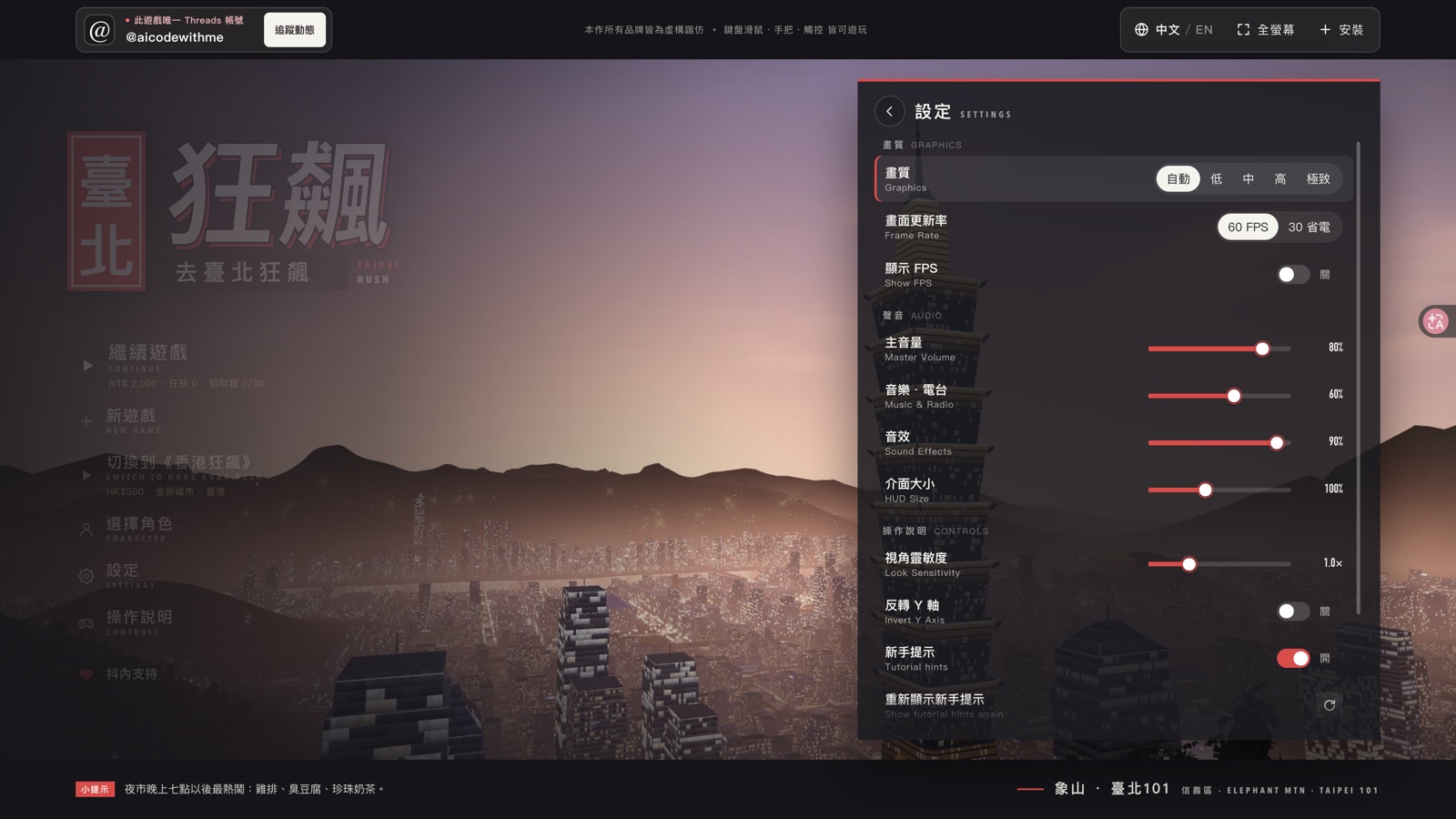
| Setting | Options (from the screenshot) | When to change it |
|---|---|---|
| Graphics | Auto, Low, Medium, High, Ultra | Low or Medium when it stutters (the code's hint: Lower the graphics if the game stutters) |
| Frame Rate | 60 FPS or 30 Saver | 30 on a laptop on battery |
| Volumes, HUD Size | Sliders | Radio too loud, text too small |
| Look Sensitivity, Invert Y Axis | Slider, On / Off | Camera spins too fast |
| Tutorial hints | On / Off, show again | To replay the lessons |
Next: pick a path from the Stats page
Stats in the pause menu is your progress sheet. Once the prologue is done, pick a path:
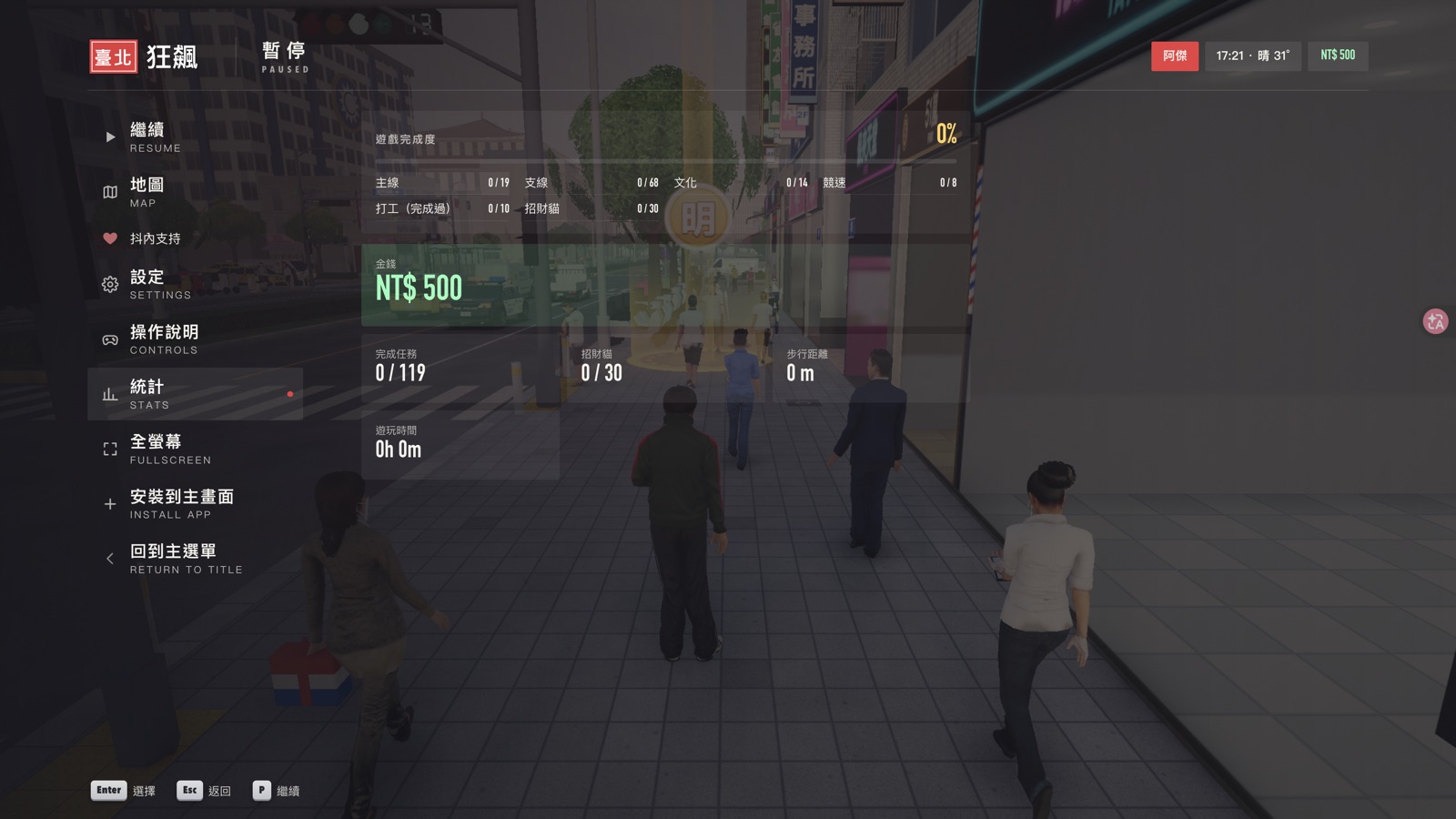
| Goal | Where to start | Guide on this site |
|---|---|---|
| Clear missions | Missions app, filtered by type and area | Mission guide |
| Collect lucky cats | Stats shows 0/30 | Lucky cat progress |
| Lose the police | Stars and the minimap search circle | Wanted and search |
| Go to Hong Kong | Switch to Hong Kong Rush on the title menu, or fly Rush Air from Songshan Airport | Travel guide |
| Go to Kaohsiung | High-speed rail ticket at Taipei Main Station (early access, per the author) | Travel guide |
| Stutter or black screen | Lower Graphics first | Troubleshooting |
Every guide above is in this page's Read next list; the full key list is in the controls reference.
Sources and method
Three kinds of evidence: this site's own play (ten screenshots taken on October 10, 2026 in desktop Edge on this site's /play/ copy, with the interface demo labeled), in-game text (tutorial hints, tips, the mission card, Settings and Stats), and code reading (prologue order, tea egg healing, hospital and arrest charges, save timing, character differences), which the text flags as coming from the code.
- Open the original game · original game page
- View UI code · public loaded game code
- Editorial method · how code checks and play tests are separated
Method and date · Method: a new game started on October 10, 2026 on this site's copy of author build f0c53c96849d, checking the opening screen, phone, Missions app, map, Settings, Controls and pause Stats, then matching interface strings and constants in the same build's public code.
Limits · Limits: this site has not finished the prologue or tested running out of health, getting busted, whether red lights add stars, or how the two characters handle. The ?uidemo interface demo is not real play. Text and numbers can change when the game updates.